How to Unit Test Your LLM Function Calls
Evaluation

Matt Wyman

,

CEO & Founder

Sarah Barber

,

Senior Technical Content Writer

January 16, 2026

Today, LLMs typically have function-calling capabilities that allow them to use tools and interact with the outside world. The setup for this often involves more moving parts than a standard LLM. This means there are more places for things to go wrong, but also more parts that you can individually unit test.

Testing anything involving LLMs can be tricky due to their nondeterministic outputs, but some reliable ways to test LLM outputs have been recently developed, including Okareo's LLM evaluation platform. This initially began as a way for LLM app developers to do end-to-end testing on the entire output of the LLM backing their application.

As well as implementing end-to-end testing, it's also a good idea to implement unit testing so when your LLM fails, you can understand exactly which part needs fixing. This becomes even more important when your LLM is doing function calling, as there are more components and systems that need to be tested separately.

In this article we explain what's involved in function calling unit testing, list all the different parts of a function-calling LLM that are available to be tested, and show how to test them.

What is function calling unit testing?

Function calling unit testing involves thinking of all the different parts of your function-calling LLM (or multi-agent system) and then writing automated tests to defend against any issues that could happen with them.

Function-calling LLMs typically start by analyzing a user's request to determine whether a function call is needed. If so, they then generate a "function call," which is typically some JSON with the name of a function and some names (and data types) of parameters to send to it. Then, either another agent in the network or your application code uses that JSON to determine which function should be called and calls the function.

An example function call:

{
    "name": "generate_code_meme",
    "parameter_definitions": {
        "language": {
            "value": "Python",
            "type": "str",
            "required": true
        },
        "theme": {
            "value": "compilation",
            "type": "str",
            "required": true
        },
        "top_text": {
            "value": "When your code compiles on the first try...",
            "type": "str",
            "required": false
        },
        "bottom_text": {
            "value": "...but now you don’t trust it.",
            "type": "str",
            "required": false
        }
    }
}

Before an LLM can generate a function call, it needs to be aware of all the possible functions available to it. The LLM is made aware of all these functions through function schema registration, which typically happens when the LLM is first set up.

After the function call has been generated, either another LLM or your application code will call the actual code function. This will return a JSON response, which an LLM will then need to convert to natural language. All this leads to a multifaceted system where the individual parts can be unit tested separately.

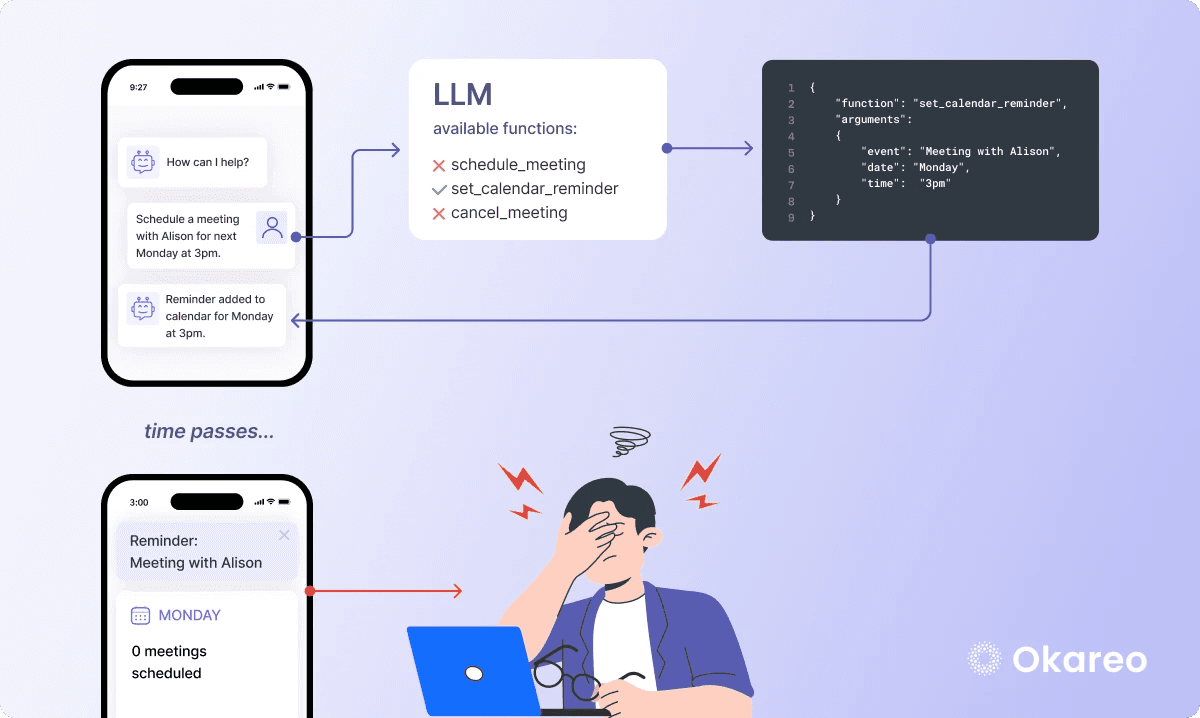
Unit testing your function calls can help you discover weird bugs in your system before your users do. For example, imagine you had an LLM app responsible for planning meetings and managing your calendar. Such an app might have different functions available to it:

schedule_meeting
cancel_meeting
set_calendar_reminder

If the LLM misinterprets the user's intent, it can end up calling the wrong function. Let's say the user wants to schedule a meeting with another user, but instead the assistant just creates a calendar reminder in the user's own calendar. It's possible that the user might not detect anything wrong until much later when the calendar reminder pops up on their phone and they realize that no meeting has been scheduled.
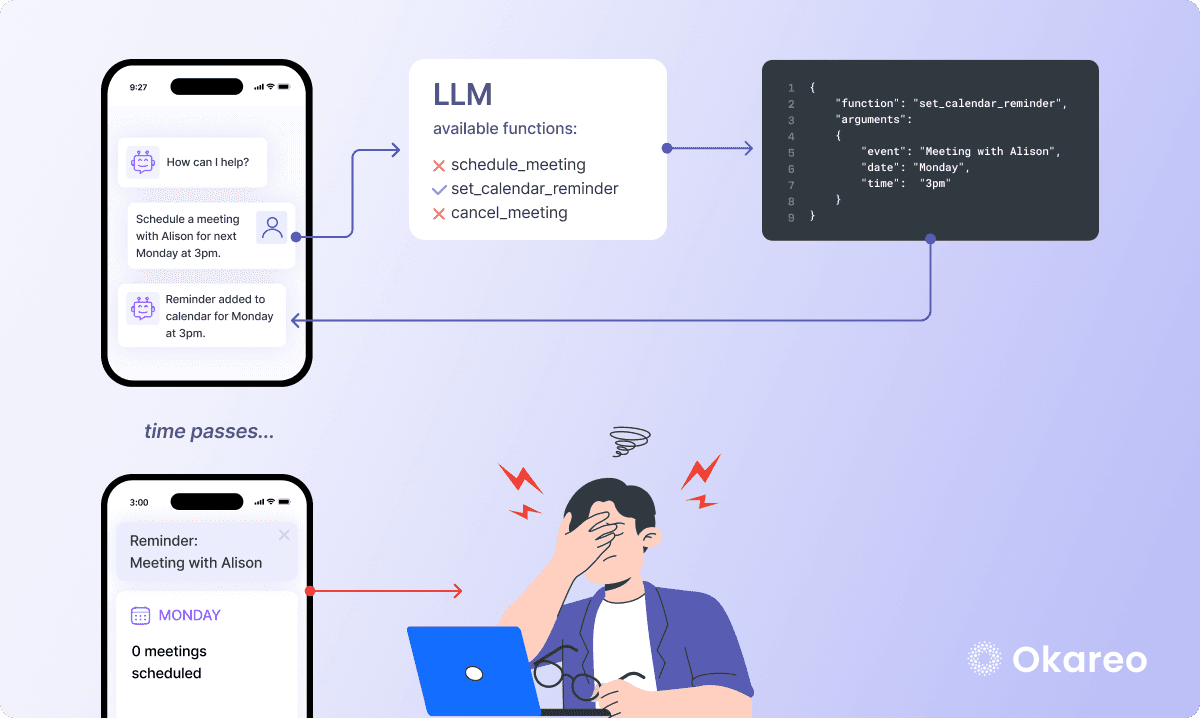
Diagram illustrating the above example of what can go wrong when you don't unit test function calls

How does function calling work?

Before diving into unit testing, let's first look at how function calling works in LLMs. Function calling gives an LLM the ability to trigger pre-built functions based on their interpretation of the user's input, and to return a structured output such as JSON instead of natural language.

There are two main ways this tends to work:

  1. A single LLM making function calls – A straightforward approach where the LLM directly maps user requests to function calls.

  2. Function calling within a multi-agent system – A more dynamic setup where multiple LLMs or agents coordinate, making function calls based on intermediate reasoning steps.

Each approach has different implications for testing, as a single LLM’s function call behavior is more deterministic, whereas a multi-agent system introduces additional complexity. Let’s explore both in detail.

Function calling using a single LLM

When using a single LLM for function calling, the model is aware of the available functions and decides when to invoke them based on the user’s request. The function calls can be defined in one of two ways:

  1. In the system prompt: An example system prompt could be as follows:

You are an AI mixologist capable of creating cocktails and suggesting pairing recommendations. Available functionalities are as follows:

1. `create_cocktail(base_spirit: str, flavor_profile: str)`: Creates a cocktail based on the selected spirit and flavor profile.
2. `suggest_food_pairing(cocktail_name: str)`: Suggests a food pairing that complements the cocktail.

When the user requests a cocktail or a pairing suggestion, provide a JSON response with the function name and arguments

  1. In an API call: Below is a sample function definition in an OpenAI API call using some Python code to demonstrate this:

import openai

client = openai.OpenAI()

# Make a request to the OpenAI API
response = client.chat.completions.create(
    model="gpt-4-turbo",
    messages=[{"role": "user", "content": "Give me a cocktail recipe. I have some rum and I like fruity flavours."}],
    functions=[ # Define the available function(s) that the LLM can call
        {
            "name": "create_cocktail",
            "description": "Generates a cocktail recipe based on the user's flavor preferences.",
            "parameters": {
                "type": "object",
                "properties": {
                    "name": {"type": "string", "description": "The name of the drink"},
                    "base_spirit": {
                        "type": "string",
                        "enum": ["Rum", "Vodka", "Tequila", "Whiskey", "Gin"]
                    },
                    "flavor_profile": {
                        "type": "string",
                        "enum": ["Sweet", "Fruity", "Bitter", "Sour", "Spicy"]
                    },
                    "garnish": {"type": "string", "description": "The name of the garnish"}
                },
                "required": ["name", "base_spirit", "flavor_profile", "garnish"]
            }
        }
    ],
    function_call="auto" # Allows the LLM to determine if a function call is needed
)

print(response)

In both cases, the LLM analyzes user input and, if it determines that a function call is required, it returns a structured response containing the function name and its arguments. In the case of the code above, the response could look something like this:

{
    "id": "chatcmpl-xyz123",
    "object": "chat.completion",
    "created": 1900000000,
    "model": "gpt-4-turbo",
    "choices": [
        {
            "index": 0,
            "message": {
                "role": "assistant",
                "content": null,
                "function_call": {
                    "name": "create_cocktail",
                    "arguments": "{\n  \"name\": \"Golden Sunset\",\n  \"base_spirit\": \"Rum\",\n  \"flavor_profile\": \"Fruity\",\n  \"garnish\": \"Pineapple slice\" \n}"
                }
            },
            "finish_reason": "function_call"
        }
    ],
    "usage": {
        "prompt_tokens": 160,
        "completion_tokens": 30,
        "total_tokens": 140
    }
}

The response should contain the name of the function and its arguments, which the application code can then pull out and use to execute the create_cocktail function, returning something like:

{
    "name": "Golden Sunset",
    "base_spirit": "Rum",
    "flavor_profile": "Fruity",
    "ingredients": ["Pineapple juice", "Passionfruit syrup", "Lime juice"],
    "garnish": "Pineapple wedge",
    "instructions": "Shake the pineapple juice, passionfruit syrup, lime juice and rum together over ice. Strain the cocktail into a chilled glass and garnish it with a pineapple wedge."
}

Your application then may optionally ask the LLM to format this response in natural language. This will allow your application to respond to the user query in kind:
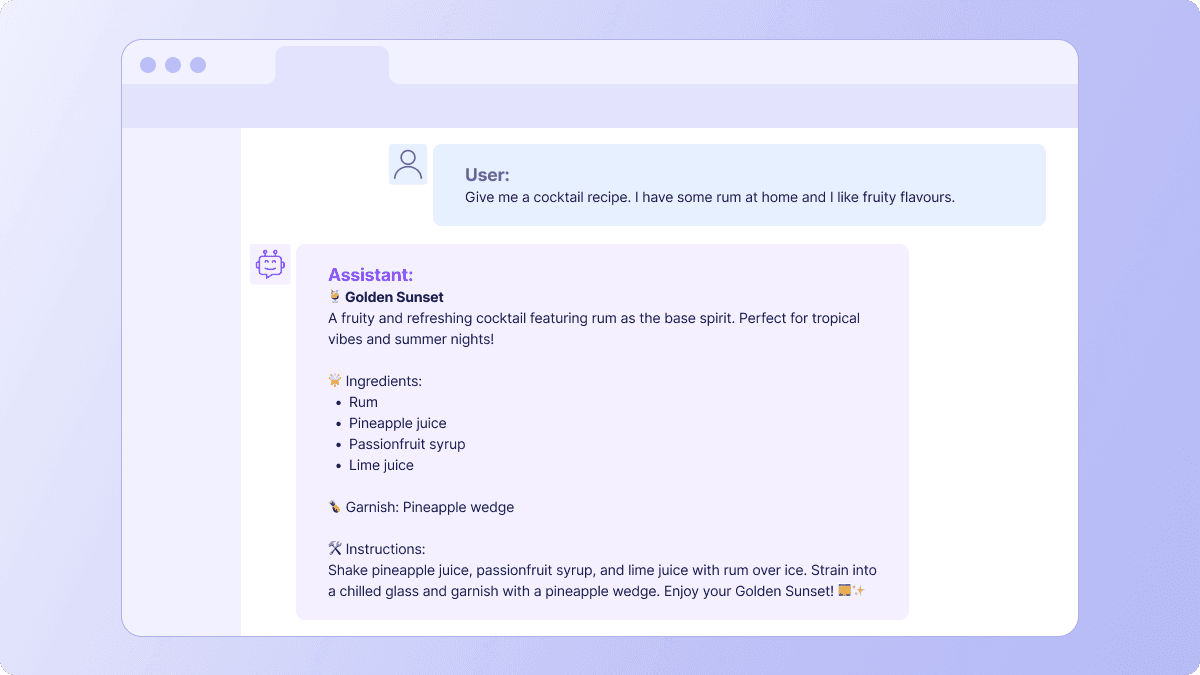
An AI app responds to a user’s prompt to create a cocktail recipe in natural language, informed by data from a function call.

Function calling using a multi-agent system

In a multi-agent system, multiple LLMs (or AI agents) collaborate with each other, each specializing in a specific task. This is also sometimes known as an agent network. You can build your own agent network or use an agent network framework that provides predefined components, APIs, and orchestration tools for building agent networks (like Autogen, CrewAI, or Vercel AI SDK).

In a multi-agent system, each agent typically has its own goals, and they communicate with each other through messages, shared memory, or function calls.

Example:

  • A planner agent determines the tasks and schedules meetings.

  • A researcher agent gathers relevant information from external sources.

  • A responder agent formats and delivers the final response to the user.

Just like with a single LLM, each agent has to be aware of the functions available to it. They are typically given a schema of all the functions available to them at runtime. 

Here's a code example of some CrewAI agents being defined, along with the tools (functions) available to them.

planner_tools = [{"name": "schedule_meeting", "description": "Schedules a meeting"}]
researcher_tools = [{"name": "search_web", "description": "Searches the internet"}]
responder_tools = [{"name": "send_email", "description": "Sends an email"}]

agents = [
    Agent(name="Planner", tools=planner_tools),
    Agent(name="Researcher", tools=researcher_tools),
    Agent(name="Responder", tools=responder_tools),
]

Another way that agents can be made aware of the tools available to them is via an external function registry (a database of functions). This is useful when functions change frequently, as the functions can be dynamically assigned from the registry.

from crewai import Agent

# Simulated function registry (could be a database or API response)
FUNCTION_REGISTRY = {
    "Planner": [{"name": "schedule_meeting", "description": "Schedules a meeting"}],
    "Researcher": [{"name": "search_web", "description": "Searches the internet"}]
}

def get_tools_for_agent(agent_name):
    """Fetch tools dynamically from the function registry."""
    return FUNCTION_REGISTRY.get(agent_name, [])


# Dynamically assign tools from function registry
agents = [
    Agent(name="Planner", tools=get_tools_for_agent("Planner")),
    Agent(name="Researcher", tools=get_tools_for_agent("Researcher"))
]

To interact with the multi-agent system, your application code needs to send a user request to the primary agent within the network (the one responsible for communicating with the outside world). 

Your implementation will then depend on whether you have a centralized or decentralized agent architecture, but essentially, one agent is responsible for generating the correct function call. Once it has generated this JSON, the JSON is sent to another agent that is responsible for actually calling the function.The actual function may be part of your application code or something third party.

The response to the function call is typically JSON, and it is passed back to the primary agent. The primary agent then sends this JSON data to another LLM agent, asking it to generate a natural language response. Once this agent has responded, the primary agent returns the final response to your application.

How to unit test your LLM's function-calling capabilities

There is much more to unit testing function calls than simply unit testing the function itself. Of course, you still need to unit test all code functions that you've written, but there are many other moving parts that you need to test when it comes to LLM function calling.

What else you need to test:

  • Whether the LLM generates the function call correctly

  • Whether it registers the function schemas correctly

  • Whether the function binding is correct 

  • Whether the LLM actually calls the function

  • Whether the overall system produces acceptable results

Here's how to test each of these:

Testing whether the LLM generates the function call correctly

When an LLM generates a function call, it will resemble a structure like this:

{
    "name": str, # the name of the function to be called
    "parameter_definitions": {
        "parameter_1": {
            "value": ...,
            "type": str | bool | int | float | dict,
            "required": bool,
        },
        ...
    }
}

You need to check that the LLM generates the correct function name, parameters and parameter types for a variety of likely user inputs. For example, if a user asks "Can you delete my account? My name is Bob," then assuming that the LLM has access to a delete_account function, it might return a structured response such as:

 "function": {{"name": "delete_account", "arguments": { "username": "Bob" }, "__required": ["username"]}}

You can use Okareo to create user input scenarios that pair a sample user input with a gold standard response and run an evaluation to determine how well the LLM or multi-agent system is performing. This includes checking how well your system handles errors (for example, does the system return an error if the LLM generates an unregistered function or has incorrect or missing parameters?), and whether it provides meaningful fallback responses when things aren't working. For more details on this, check out our function-calling evaluations article.

Testing function schema registration

A function schema is a description of a function and the parameters it can take. The best way to prove that the LLM is aware of all the functions it can call (and its parameters) is to test that the schemas were registered.

How to test the function schema registration depends on how you're storing the schemas. If they're stored on the agent or LLM itself, the simplest way is to mock the agent, add the schemas to it (either by passing the function schemas dynamically at runtime or via a system prompt) and then assert that the correct functions and parameters are registered with the agent. Below is an example of how to test the function schema registration of the CrewAI planning agent from earlier.

import unittest
from unittest.mock import patch
from crewai import Agent

# Assume this is an external function registry (normally fetched from a database/API)
FUNCTION_REGISTRY = {}

def get_tools_for_agent(agent_name):
    """Fetch tools dynamically from an external function registry (for example, API or database)."""
    return FUNCTION_REGISTRY.get(agent_name, [])

class TestPlannerFunctionSchemaRegistration(unittest.TestCase):
    @patch("__main__.FUNCTION_REGISTRY", {"Planner": [{"name": "schedule_meeting", "description": "Schedules a meeting"}]})
    def test_function_schema_registration(self):
        """Ensure the Planner agent receives the correct function schema from an external registry."""
        
        # Create the agent using the external function registry
        planner_agent = Agent(name="Planner", tools=get_tools_for_agent("Planner"))

        # Expected function schema from the mocked registry
        expected_schema = [{"name": "schedule_meeting", "description": "Schedules a meeting"}]

        # Assert that the function schema is correctly assigned
        self.assertEqual(planner_agent.tools, expected_schema)

if __name__ == "__main__":
    unittest.main()

Alternatively, if your schemas are stored externally (for example, in a database or accessed via an API), then you'd need to mock the database or API, then make some calls to add the function schemas, and then assert that the schemas exist.

Testing function binding

Function binding ensures that the function names declared in the function schema are correctly mapped to actual executable functions in the code. If the function names are not properly bound, the system might fail to execute function calls or produce incorrect output. An example of a function binding map that is correctly mapping functions from the function schema to the actual code function is below.
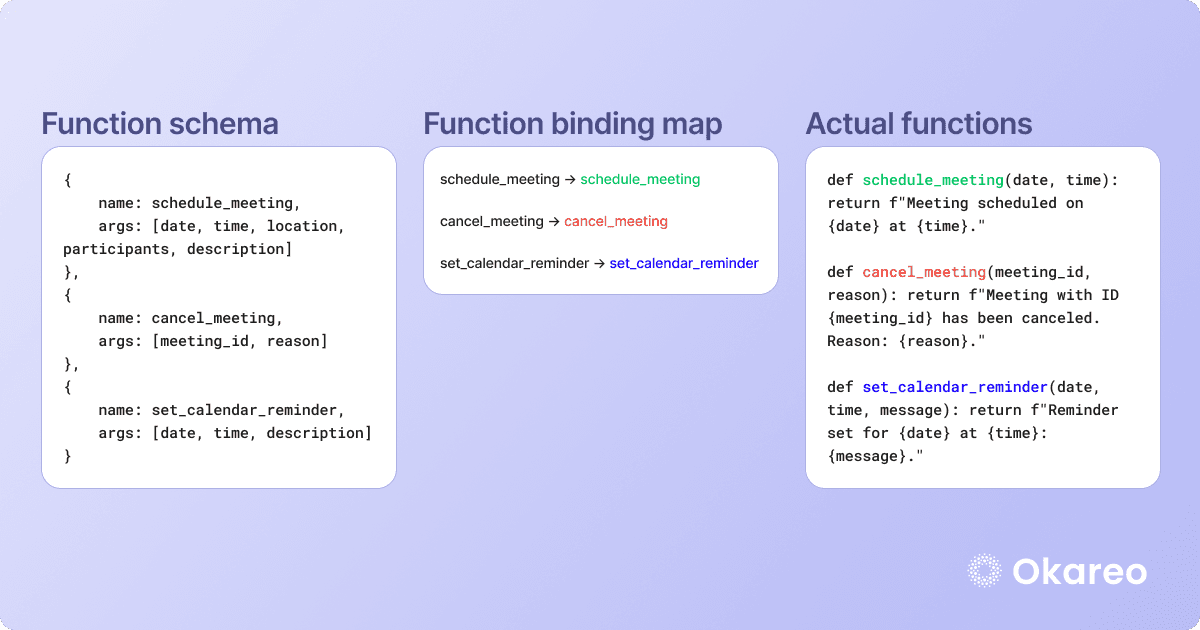
Diagram showing how a function binding map works in function calling

To test that the function binding is working correctly, you need to first check that each function name that you might want to call exists in the function map (see the test_function_names_exist unit test below), and then test that each function name maps to the correct function. This is covered in the test_function_mappings_are_correct test below.

import unittest

# Function implementations
def schedule_meeting(date, time):
    return f"Meeting scheduled on {date} at {time}."

def search_web(query):
    return f"Searching the web for: {query}"

# Function binding map
FUNCTION_MAP = {
    "schedule_meeting": schedule_meeting,
    "search_web": search_web
}

# Expected function mappings (should match FUNCTION_MAP)
EXPECTED_FUNCTIONS = {
    "schedule_meeting": schedule_meeting,
    "search_web": search_web
}

class TestFunctionBinding(unittest.TestCase):

    def test_function_names_exist(self):
        """Ensure all expected function names exist in the function map."""
        for function_name in EXPECTED_FUNCTIONS.keys():
            self.assertIn(function_name, FUNCTION_MAP, f"Function '{function_name}' is missing in FUNCTION_MAP.")

    def test_function_mappings_are_correct(self):
        """Ensure each function name correctly maps to the intended function."""
        for function_name, expected_function in EXPECTED_FUNCTIONS.items():
            self.assertIs(FUNCTION_MAP[function_name], expected_function,
                          f"Function '{function_name}' is incorrectly mapped.")

if __name__ == "__main__":
    unittest.main()

Testing whether the function is actually called

An important unit test to add is one that tests whether your function actually gets called. It's critical to test this, because an LLM can sometimes misinterpret the user's intent and call the wrong function, or sometimes there might be some logical or coding issue that causes it to skip the function call entirely.

To test that the LLM calls the function, you can mock the function, call the mocked function via your normal routing logic, then assert that the LLM called the function at least once. An example unit test for this is below:

import unittest
from unittest.mock import MagicMock

# Function that should be called
def schedule_meeting(date, time):
    return f"Meeting scheduled on {date} at {time}."

# Function map where LLM function calls are routed
FUNCTION_MAP = {
    "schedule_meeting": schedule_meeting
}

def execute_function(function_name, *args, **kwargs):
    """Executes a function from FUNCTION_MAP if it exists."""
    if function_name in FUNCTION_MAP:
        return FUNCTION_MAP[function_name](*args, **kwargs)
    raise ValueError(f"Function '{function_name}' is not registered.")

class TestFunctionCall(unittest.TestCase):
    def test_function_is_called(self):
        """Test that the function is actually called during execution."""
        # Mock the function
        mock_function = MagicMock(return_value="Mocked meeting scheduled.")

        # Replace the real function with the mock function
        FUNCTION_MAP["schedule_meeting"] = mock_function

        # Call the function through the normal routing logic
        execute_function("schedule_meeting", "2025-02-10", "14:00")

        # Assert that the LLM called the function at least once
        mock_function.assert_called_once_with("2025-02-10", "14:00")

if __name__ == "__main__":
    unittest.main()

For best results, combine function calling unit testing with LLM evaluation

To ensure the reliability of function calling in LLMs, it’s important to implement both unit testing and end-to-end evaluation. Unit testing focuses on deterministic components, ensuring that function calls are correctly registered, mapped, and executed. But as LLMs generally produce non-deterministic results, end-to-end testing is also important. Traditional unit testing alone will not fully cover an LLM's behavior.

For end-to-end testing, Okareo's platform offers custom LLM evaluations, providing a comprehensive way to assess the performance of LLM systems, including agent networks and function-calling LLMs. To try Okareo today, you can sign up here.

Today, LLMs typically have function-calling capabilities that allow them to use tools and interact with the outside world. The setup for this often involves more moving parts than a standard LLM. This means there are more places for things to go wrong, but also more parts that you can individually unit test.

Testing anything involving LLMs can be tricky due to their nondeterministic outputs, but some reliable ways to test LLM outputs have been recently developed, including Okareo's LLM evaluation platform. This initially began as a way for LLM app developers to do end-to-end testing on the entire output of the LLM backing their application.

As well as implementing end-to-end testing, it's also a good idea to implement unit testing so when your LLM fails, you can understand exactly which part needs fixing. This becomes even more important when your LLM is doing function calling, as there are more components and systems that need to be tested separately.

In this article we explain what's involved in function calling unit testing, list all the different parts of a function-calling LLM that are available to be tested, and show how to test them.

What is function calling unit testing?

Function calling unit testing involves thinking of all the different parts of your function-calling LLM (or multi-agent system) and then writing automated tests to defend against any issues that could happen with them.

Function-calling LLMs typically start by analyzing a user's request to determine whether a function call is needed. If so, they then generate a "function call," which is typically some JSON with the name of a function and some names (and data types) of parameters to send to it. Then, either another agent in the network or your application code uses that JSON to determine which function should be called and calls the function.

An example function call:

{
    "name": "generate_code_meme",
    "parameter_definitions": {
        "language": {
            "value": "Python",
            "type": "str",
            "required": true
        },
        "theme": {
            "value": "compilation",
            "type": "str",
            "required": true
        },
        "top_text": {
            "value": "When your code compiles on the first try...",
            "type": "str",
            "required": false
        },
        "bottom_text": {
            "value": "...but now you don’t trust it.",
            "type": "str",
            "required": false
        }
    }
}

Before an LLM can generate a function call, it needs to be aware of all the possible functions available to it. The LLM is made aware of all these functions through function schema registration, which typically happens when the LLM is first set up.

After the function call has been generated, either another LLM or your application code will call the actual code function. This will return a JSON response, which an LLM will then need to convert to natural language. All this leads to a multifaceted system where the individual parts can be unit tested separately.

Unit testing your function calls can help you discover weird bugs in your system before your users do. For example, imagine you had an LLM app responsible for planning meetings and managing your calendar. Such an app might have different functions available to it:

schedule_meeting
cancel_meeting
set_calendar_reminder

If the LLM misinterprets the user's intent, it can end up calling the wrong function. Let's say the user wants to schedule a meeting with another user, but instead the assistant just creates a calendar reminder in the user's own calendar. It's possible that the user might not detect anything wrong until much later when the calendar reminder pops up on their phone and they realize that no meeting has been scheduled.

Diagram illustrating the above example of what can go wrong when you don't unit test function calls

How does function calling work?

Before diving into unit testing, let's first look at how function calling works in LLMs. Function calling gives an LLM the ability to trigger pre-built functions based on their interpretation of the user's input, and to return a structured output such as JSON instead of natural language.

There are two main ways this tends to work:

  1. A single LLM making function calls – A straightforward approach where the LLM directly maps user requests to function calls.

  2. Function calling within a multi-agent system – A more dynamic setup where multiple LLMs or agents coordinate, making function calls based on intermediate reasoning steps.

Each approach has different implications for testing, as a single LLM’s function call behavior is more deterministic, whereas a multi-agent system introduces additional complexity. Let’s explore both in detail.

Function calling using a single LLM

When using a single LLM for function calling, the model is aware of the available functions and decides when to invoke them based on the user’s request. The function calls can be defined in one of two ways:

  1. In the system prompt: An example system prompt could be as follows:

You are an AI mixologist capable of creating cocktails and suggesting pairing recommendations. Available functionalities are as follows:

1. `create_cocktail(base_spirit: str, flavor_profile: str)`: Creates a cocktail based on the selected spirit and flavor profile.
2. `suggest_food_pairing(cocktail_name: str)`: Suggests a food pairing that complements the cocktail.

When the user requests a cocktail or a pairing suggestion, provide a JSON response with the function name and arguments

  1. In an API call: Below is a sample function definition in an OpenAI API call using some Python code to demonstrate this:

import openai

client = openai.OpenAI()

# Make a request to the OpenAI API
response = client.chat.completions.create(
    model="gpt-4-turbo",
    messages=[{"role": "user", "content": "Give me a cocktail recipe. I have some rum and I like fruity flavours."}],
    functions=[ # Define the available function(s) that the LLM can call
        {
            "name": "create_cocktail",
            "description": "Generates a cocktail recipe based on the user's flavor preferences.",
            "parameters": {
                "type": "object",
                "properties": {
                    "name": {"type": "string", "description": "The name of the drink"},
                    "base_spirit": {
                        "type": "string",
                        "enum": ["Rum", "Vodka", "Tequila", "Whiskey", "Gin"]
                    },
                    "flavor_profile": {
                        "type": "string",
                        "enum": ["Sweet", "Fruity", "Bitter", "Sour", "Spicy"]
                    },
                    "garnish": {"type": "string", "description": "The name of the garnish"}
                },
                "required": ["name", "base_spirit", "flavor_profile", "garnish"]
            }
        }
    ],
    function_call="auto" # Allows the LLM to determine if a function call is needed
)

print(response)

In both cases, the LLM analyzes user input and, if it determines that a function call is required, it returns a structured response containing the function name and its arguments. In the case of the code above, the response could look something like this:

{
    "id": "chatcmpl-xyz123",
    "object": "chat.completion",
    "created": 1900000000,
    "model": "gpt-4-turbo",
    "choices": [
        {
            "index": 0,
            "message": {
                "role": "assistant",
                "content": null,
                "function_call": {
                    "name": "create_cocktail",
                    "arguments": "{\n  \"name\": \"Golden Sunset\",\n  \"base_spirit\": \"Rum\",\n  \"flavor_profile\": \"Fruity\",\n  \"garnish\": \"Pineapple slice\" \n}"
                }
            },
            "finish_reason": "function_call"
        }
    ],
    "usage": {
        "prompt_tokens": 160,
        "completion_tokens": 30,
        "total_tokens": 140
    }
}

The response should contain the name of the function and its arguments, which the application code can then pull out and use to execute the create_cocktail function, returning something like:

{
    "name": "Golden Sunset",
    "base_spirit": "Rum",
    "flavor_profile": "Fruity",
    "ingredients": ["Pineapple juice", "Passionfruit syrup", "Lime juice"],
    "garnish": "Pineapple wedge",
    "instructions": "Shake the pineapple juice, passionfruit syrup, lime juice and rum together over ice. Strain the cocktail into a chilled glass and garnish it with a pineapple wedge."
}

Your application then may optionally ask the LLM to format this response in natural language. This will allow your application to respond to the user query in kind:

An AI app responds to a user’s prompt to create a cocktail recipe in natural language, informed by data from a function call.

Function calling using a multi-agent system

In a multi-agent system, multiple LLMs (or AI agents) collaborate with each other, each specializing in a specific task. This is also sometimes known as an agent network. You can build your own agent network or use an agent network framework that provides predefined components, APIs, and orchestration tools for building agent networks (like Autogen, CrewAI, or Vercel AI SDK).

In a multi-agent system, each agent typically has its own goals, and they communicate with each other through messages, shared memory, or function calls.

Example:

  • A planner agent determines the tasks and schedules meetings.

  • A researcher agent gathers relevant information from external sources.

  • A responder agent formats and delivers the final response to the user.

Just like with a single LLM, each agent has to be aware of the functions available to it. They are typically given a schema of all the functions available to them at runtime. 

Here's a code example of some CrewAI agents being defined, along with the tools (functions) available to them.

planner_tools = [{"name": "schedule_meeting", "description": "Schedules a meeting"}]
researcher_tools = [{"name": "search_web", "description": "Searches the internet"}]
responder_tools = [{"name": "send_email", "description": "Sends an email"}]

agents = [
    Agent(name="Planner", tools=planner_tools),
    Agent(name="Researcher", tools=researcher_tools),
    Agent(name="Responder", tools=responder_tools),
]

Another way that agents can be made aware of the tools available to them is via an external function registry (a database of functions). This is useful when functions change frequently, as the functions can be dynamically assigned from the registry.

from crewai import Agent

# Simulated function registry (could be a database or API response)
FUNCTION_REGISTRY = {
    "Planner": [{"name": "schedule_meeting", "description": "Schedules a meeting"}],
    "Researcher": [{"name": "search_web", "description": "Searches the internet"}]
}

def get_tools_for_agent(agent_name):
    """Fetch tools dynamically from the function registry."""
    return FUNCTION_REGISTRY.get(agent_name, [])


# Dynamically assign tools from function registry
agents = [
    Agent(name="Planner", tools=get_tools_for_agent("Planner")),
    Agent(name="Researcher", tools=get_tools_for_agent("Researcher"))
]

To interact with the multi-agent system, your application code needs to send a user request to the primary agent within the network (the one responsible for communicating with the outside world). 

Your implementation will then depend on whether you have a centralized or decentralized agent architecture, but essentially, one agent is responsible for generating the correct function call. Once it has generated this JSON, the JSON is sent to another agent that is responsible for actually calling the function.The actual function may be part of your application code or something third party.

The response to the function call is typically JSON, and it is passed back to the primary agent. The primary agent then sends this JSON data to another LLM agent, asking it to generate a natural language response. Once this agent has responded, the primary agent returns the final response to your application.

How to unit test your LLM's function-calling capabilities

There is much more to unit testing function calls than simply unit testing the function itself. Of course, you still need to unit test all code functions that you've written, but there are many other moving parts that you need to test when it comes to LLM function calling.

What else you need to test:

  • Whether the LLM generates the function call correctly

  • Whether it registers the function schemas correctly

  • Whether the function binding is correct 

  • Whether the LLM actually calls the function

  • Whether the overall system produces acceptable results

Here's how to test each of these:

Testing whether the LLM generates the function call correctly

When an LLM generates a function call, it will resemble a structure like this:

{
    "name": str, # the name of the function to be called
    "parameter_definitions": {
        "parameter_1": {
            "value": ...,
            "type": str | bool | int | float | dict,
            "required": bool,
        },
        ...
    }
}

You need to check that the LLM generates the correct function name, parameters and parameter types for a variety of likely user inputs. For example, if a user asks "Can you delete my account? My name is Bob," then assuming that the LLM has access to a delete_account function, it might return a structured response such as:

 "function": {{"name": "delete_account", "arguments": { "username": "Bob" }, "__required": ["username"]}}

You can use Okareo to create user input scenarios that pair a sample user input with a gold standard response and run an evaluation to determine how well the LLM or multi-agent system is performing. This includes checking how well your system handles errors (for example, does the system return an error if the LLM generates an unregistered function or has incorrect or missing parameters?), and whether it provides meaningful fallback responses when things aren't working. For more details on this, check out our function-calling evaluations article.

Testing function schema registration

A function schema is a description of a function and the parameters it can take. The best way to prove that the LLM is aware of all the functions it can call (and its parameters) is to test that the schemas were registered.

How to test the function schema registration depends on how you're storing the schemas. If they're stored on the agent or LLM itself, the simplest way is to mock the agent, add the schemas to it (either by passing the function schemas dynamically at runtime or via a system prompt) and then assert that the correct functions and parameters are registered with the agent. Below is an example of how to test the function schema registration of the CrewAI planning agent from earlier.

import unittest
from unittest.mock import patch
from crewai import Agent

# Assume this is an external function registry (normally fetched from a database/API)
FUNCTION_REGISTRY = {}

def get_tools_for_agent(agent_name):
    """Fetch tools dynamically from an external function registry (for example, API or database)."""
    return FUNCTION_REGISTRY.get(agent_name, [])

class TestPlannerFunctionSchemaRegistration(unittest.TestCase):
    @patch("__main__.FUNCTION_REGISTRY", {"Planner": [{"name": "schedule_meeting", "description": "Schedules a meeting"}]})
    def test_function_schema_registration(self):
        """Ensure the Planner agent receives the correct function schema from an external registry."""
        
        # Create the agent using the external function registry
        planner_agent = Agent(name="Planner", tools=get_tools_for_agent("Planner"))

        # Expected function schema from the mocked registry
        expected_schema = [{"name": "schedule_meeting", "description": "Schedules a meeting"}]

        # Assert that the function schema is correctly assigned
        self.assertEqual(planner_agent.tools, expected_schema)

if __name__ == "__main__":
    unittest.main()

Alternatively, if your schemas are stored externally (for example, in a database or accessed via an API), then you'd need to mock the database or API, then make some calls to add the function schemas, and then assert that the schemas exist.

Testing function binding

Function binding ensures that the function names declared in the function schema are correctly mapped to actual executable functions in the code. If the function names are not properly bound, the system might fail to execute function calls or produce incorrect output. An example of a function binding map that is correctly mapping functions from the function schema to the actual code function is below.

Diagram showing how a function binding map works in function calling

To test that the function binding is working correctly, you need to first check that each function name that you might want to call exists in the function map (see the test_function_names_exist unit test below), and then test that each function name maps to the correct function. This is covered in the test_function_mappings_are_correct test below.

import unittest

# Function implementations
def schedule_meeting(date, time):
    return f"Meeting scheduled on {date} at {time}."

def search_web(query):
    return f"Searching the web for: {query}"

# Function binding map
FUNCTION_MAP = {
    "schedule_meeting": schedule_meeting,
    "search_web": search_web
}

# Expected function mappings (should match FUNCTION_MAP)
EXPECTED_FUNCTIONS = {
    "schedule_meeting": schedule_meeting,
    "search_web": search_web
}

class TestFunctionBinding(unittest.TestCase):

    def test_function_names_exist(self):
        """Ensure all expected function names exist in the function map."""
        for function_name in EXPECTED_FUNCTIONS.keys():
            self.assertIn(function_name, FUNCTION_MAP, f"Function '{function_name}' is missing in FUNCTION_MAP.")

    def test_function_mappings_are_correct(self):
        """Ensure each function name correctly maps to the intended function."""
        for function_name, expected_function in EXPECTED_FUNCTIONS.items():
            self.assertIs(FUNCTION_MAP[function_name], expected_function,
                          f"Function '{function_name}' is incorrectly mapped.")

if __name__ == "__main__":
    unittest.main()

Testing whether the function is actually called

An important unit test to add is one that tests whether your function actually gets called. It's critical to test this, because an LLM can sometimes misinterpret the user's intent and call the wrong function, or sometimes there might be some logical or coding issue that causes it to skip the function call entirely.

To test that the LLM calls the function, you can mock the function, call the mocked function via your normal routing logic, then assert that the LLM called the function at least once. An example unit test for this is below:

import unittest
from unittest.mock import MagicMock

# Function that should be called
def schedule_meeting(date, time):
    return f"Meeting scheduled on {date} at {time}."

# Function map where LLM function calls are routed
FUNCTION_MAP = {
    "schedule_meeting": schedule_meeting
}

def execute_function(function_name, *args, **kwargs):
    """Executes a function from FUNCTION_MAP if it exists."""
    if function_name in FUNCTION_MAP:
        return FUNCTION_MAP[function_name](*args, **kwargs)
    raise ValueError(f"Function '{function_name}' is not registered.")

class TestFunctionCall(unittest.TestCase):
    def test_function_is_called(self):
        """Test that the function is actually called during execution."""
        # Mock the function
        mock_function = MagicMock(return_value="Mocked meeting scheduled.")

        # Replace the real function with the mock function
        FUNCTION_MAP["schedule_meeting"] = mock_function

        # Call the function through the normal routing logic
        execute_function("schedule_meeting", "2025-02-10", "14:00")

        # Assert that the LLM called the function at least once
        mock_function.assert_called_once_with("2025-02-10", "14:00")

if __name__ == "__main__":
    unittest.main()

For best results, combine function calling unit testing with LLM evaluation

To ensure the reliability of function calling in LLMs, it’s important to implement both unit testing and end-to-end evaluation. Unit testing focuses on deterministic components, ensuring that function calls are correctly registered, mapped, and executed. But as LLMs generally produce non-deterministic results, end-to-end testing is also important. Traditional unit testing alone will not fully cover an LLM's behavior.

For end-to-end testing, Okareo's platform offers custom LLM evaluations, providing a comprehensive way to assess the performance of LLM systems, including agent networks and function-calling LLMs. To try Okareo today, you can sign up here.

Today, LLMs typically have function-calling capabilities that allow them to use tools and interact with the outside world. The setup for this often involves more moving parts than a standard LLM. This means there are more places for things to go wrong, but also more parts that you can individually unit test.

Testing anything involving LLMs can be tricky due to their nondeterministic outputs, but some reliable ways to test LLM outputs have been recently developed, including Okareo's LLM evaluation platform. This initially began as a way for LLM app developers to do end-to-end testing on the entire output of the LLM backing their application.

As well as implementing end-to-end testing, it's also a good idea to implement unit testing so when your LLM fails, you can understand exactly which part needs fixing. This becomes even more important when your LLM is doing function calling, as there are more components and systems that need to be tested separately.

In this article we explain what's involved in function calling unit testing, list all the different parts of a function-calling LLM that are available to be tested, and show how to test them.

What is function calling unit testing?

Function calling unit testing involves thinking of all the different parts of your function-calling LLM (or multi-agent system) and then writing automated tests to defend against any issues that could happen with them.

Function-calling LLMs typically start by analyzing a user's request to determine whether a function call is needed. If so, they then generate a "function call," which is typically some JSON with the name of a function and some names (and data types) of parameters to send to it. Then, either another agent in the network or your application code uses that JSON to determine which function should be called and calls the function.

An example function call:

{
    "name": "generate_code_meme",
    "parameter_definitions": {
        "language": {
            "value": "Python",
            "type": "str",
            "required": true
        },
        "theme": {
            "value": "compilation",
            "type": "str",
            "required": true
        },
        "top_text": {
            "value": "When your code compiles on the first try...",
            "type": "str",
            "required": false
        },
        "bottom_text": {
            "value": "...but now you don’t trust it.",
            "type": "str",
            "required": false
        }
    }
}

Before an LLM can generate a function call, it needs to be aware of all the possible functions available to it. The LLM is made aware of all these functions through function schema registration, which typically happens when the LLM is first set up.

After the function call has been generated, either another LLM or your application code will call the actual code function. This will return a JSON response, which an LLM will then need to convert to natural language. All this leads to a multifaceted system where the individual parts can be unit tested separately.

Unit testing your function calls can help you discover weird bugs in your system before your users do. For example, imagine you had an LLM app responsible for planning meetings and managing your calendar. Such an app might have different functions available to it:

schedule_meeting
cancel_meeting
set_calendar_reminder

If the LLM misinterprets the user's intent, it can end up calling the wrong function. Let's say the user wants to schedule a meeting with another user, but instead the assistant just creates a calendar reminder in the user's own calendar. It's possible that the user might not detect anything wrong until much later when the calendar reminder pops up on their phone and they realize that no meeting has been scheduled.

Diagram illustrating the above example of what can go wrong when you don't unit test function calls

How does function calling work?

Before diving into unit testing, let's first look at how function calling works in LLMs. Function calling gives an LLM the ability to trigger pre-built functions based on their interpretation of the user's input, and to return a structured output such as JSON instead of natural language.

There are two main ways this tends to work:

  1. A single LLM making function calls – A straightforward approach where the LLM directly maps user requests to function calls.

  2. Function calling within a multi-agent system – A more dynamic setup where multiple LLMs or agents coordinate, making function calls based on intermediate reasoning steps.

Each approach has different implications for testing, as a single LLM’s function call behavior is more deterministic, whereas a multi-agent system introduces additional complexity. Let’s explore both in detail.

Function calling using a single LLM

When using a single LLM for function calling, the model is aware of the available functions and decides when to invoke them based on the user’s request. The function calls can be defined in one of two ways:

  1. In the system prompt: An example system prompt could be as follows:

You are an AI mixologist capable of creating cocktails and suggesting pairing recommendations. Available functionalities are as follows:

1. `create_cocktail(base_spirit: str, flavor_profile: str)`: Creates a cocktail based on the selected spirit and flavor profile.
2. `suggest_food_pairing(cocktail_name: str)`: Suggests a food pairing that complements the cocktail.

When the user requests a cocktail or a pairing suggestion, provide a JSON response with the function name and arguments

  1. In an API call: Below is a sample function definition in an OpenAI API call using some Python code to demonstrate this:

import openai

client = openai.OpenAI()

# Make a request to the OpenAI API
response = client.chat.completions.create(
    model="gpt-4-turbo",
    messages=[{"role": "user", "content": "Give me a cocktail recipe. I have some rum and I like fruity flavours."}],
    functions=[ # Define the available function(s) that the LLM can call
        {
            "name": "create_cocktail",
            "description": "Generates a cocktail recipe based on the user's flavor preferences.",
            "parameters": {
                "type": "object",
                "properties": {
                    "name": {"type": "string", "description": "The name of the drink"},
                    "base_spirit": {
                        "type": "string",
                        "enum": ["Rum", "Vodka", "Tequila", "Whiskey", "Gin"]
                    },
                    "flavor_profile": {
                        "type": "string",
                        "enum": ["Sweet", "Fruity", "Bitter", "Sour", "Spicy"]
                    },
                    "garnish": {"type": "string", "description": "The name of the garnish"}
                },
                "required": ["name", "base_spirit", "flavor_profile", "garnish"]
            }
        }
    ],
    function_call="auto" # Allows the LLM to determine if a function call is needed
)

print(response)

In both cases, the LLM analyzes user input and, if it determines that a function call is required, it returns a structured response containing the function name and its arguments. In the case of the code above, the response could look something like this:

{
    "id": "chatcmpl-xyz123",
    "object": "chat.completion",
    "created": 1900000000,
    "model": "gpt-4-turbo",
    "choices": [
        {
            "index": 0,
            "message": {
                "role": "assistant",
                "content": null,
                "function_call": {
                    "name": "create_cocktail",
                    "arguments": "{\n  \"name\": \"Golden Sunset\",\n  \"base_spirit\": \"Rum\",\n  \"flavor_profile\": \"Fruity\",\n  \"garnish\": \"Pineapple slice\" \n}"
                }
            },
            "finish_reason": "function_call"
        }
    ],
    "usage": {
        "prompt_tokens": 160,
        "completion_tokens": 30,
        "total_tokens": 140
    }
}

The response should contain the name of the function and its arguments, which the application code can then pull out and use to execute the create_cocktail function, returning something like:

{
    "name": "Golden Sunset",
    "base_spirit": "Rum",
    "flavor_profile": "Fruity",
    "ingredients": ["Pineapple juice", "Passionfruit syrup", "Lime juice"],
    "garnish": "Pineapple wedge",
    "instructions": "Shake the pineapple juice, passionfruit syrup, lime juice and rum together over ice. Strain the cocktail into a chilled glass and garnish it with a pineapple wedge."
}

Your application then may optionally ask the LLM to format this response in natural language. This will allow your application to respond to the user query in kind:

An AI app responds to a user’s prompt to create a cocktail recipe in natural language, informed by data from a function call.

Function calling using a multi-agent system

In a multi-agent system, multiple LLMs (or AI agents) collaborate with each other, each specializing in a specific task. This is also sometimes known as an agent network. You can build your own agent network or use an agent network framework that provides predefined components, APIs, and orchestration tools for building agent networks (like Autogen, CrewAI, or Vercel AI SDK).

In a multi-agent system, each agent typically has its own goals, and they communicate with each other through messages, shared memory, or function calls.

Example:

  • A planner agent determines the tasks and schedules meetings.

  • A researcher agent gathers relevant information from external sources.

  • A responder agent formats and delivers the final response to the user.

Just like with a single LLM, each agent has to be aware of the functions available to it. They are typically given a schema of all the functions available to them at runtime. 

Here's a code example of some CrewAI agents being defined, along with the tools (functions) available to them.

planner_tools = [{"name": "schedule_meeting", "description": "Schedules a meeting"}]
researcher_tools = [{"name": "search_web", "description": "Searches the internet"}]
responder_tools = [{"name": "send_email", "description": "Sends an email"}]

agents = [
    Agent(name="Planner", tools=planner_tools),
    Agent(name="Researcher", tools=researcher_tools),
    Agent(name="Responder", tools=responder_tools),
]

Another way that agents can be made aware of the tools available to them is via an external function registry (a database of functions). This is useful when functions change frequently, as the functions can be dynamically assigned from the registry.

from crewai import Agent

# Simulated function registry (could be a database or API response)
FUNCTION_REGISTRY = {
    "Planner": [{"name": "schedule_meeting", "description": "Schedules a meeting"}],
    "Researcher": [{"name": "search_web", "description": "Searches the internet"}]
}

def get_tools_for_agent(agent_name):
    """Fetch tools dynamically from the function registry."""
    return FUNCTION_REGISTRY.get(agent_name, [])


# Dynamically assign tools from function registry
agents = [
    Agent(name="Planner", tools=get_tools_for_agent("Planner")),
    Agent(name="Researcher", tools=get_tools_for_agent("Researcher"))
]

To interact with the multi-agent system, your application code needs to send a user request to the primary agent within the network (the one responsible for communicating with the outside world). 

Your implementation will then depend on whether you have a centralized or decentralized agent architecture, but essentially, one agent is responsible for generating the correct function call. Once it has generated this JSON, the JSON is sent to another agent that is responsible for actually calling the function.The actual function may be part of your application code or something third party.

The response to the function call is typically JSON, and it is passed back to the primary agent. The primary agent then sends this JSON data to another LLM agent, asking it to generate a natural language response. Once this agent has responded, the primary agent returns the final response to your application.

How to unit test your LLM's function-calling capabilities

There is much more to unit testing function calls than simply unit testing the function itself. Of course, you still need to unit test all code functions that you've written, but there are many other moving parts that you need to test when it comes to LLM function calling.

What else you need to test:

  • Whether the LLM generates the function call correctly

  • Whether it registers the function schemas correctly

  • Whether the function binding is correct 

  • Whether the LLM actually calls the function

  • Whether the overall system produces acceptable results

Here's how to test each of these:

Testing whether the LLM generates the function call correctly

When an LLM generates a function call, it will resemble a structure like this:

{
    "name": str, # the name of the function to be called
    "parameter_definitions": {
        "parameter_1": {
            "value": ...,
            "type": str | bool | int | float | dict,
            "required": bool,
        },
        ...
    }
}

You need to check that the LLM generates the correct function name, parameters and parameter types for a variety of likely user inputs. For example, if a user asks "Can you delete my account? My name is Bob," then assuming that the LLM has access to a delete_account function, it might return a structured response such as:

 "function": {{"name": "delete_account", "arguments": { "username": "Bob" }, "__required": ["username"]}}

You can use Okareo to create user input scenarios that pair a sample user input with a gold standard response and run an evaluation to determine how well the LLM or multi-agent system is performing. This includes checking how well your system handles errors (for example, does the system return an error if the LLM generates an unregistered function or has incorrect or missing parameters?), and whether it provides meaningful fallback responses when things aren't working. For more details on this, check out our function-calling evaluations article.

Testing function schema registration

A function schema is a description of a function and the parameters it can take. The best way to prove that the LLM is aware of all the functions it can call (and its parameters) is to test that the schemas were registered.

How to test the function schema registration depends on how you're storing the schemas. If they're stored on the agent or LLM itself, the simplest way is to mock the agent, add the schemas to it (either by passing the function schemas dynamically at runtime or via a system prompt) and then assert that the correct functions and parameters are registered with the agent. Below is an example of how to test the function schema registration of the CrewAI planning agent from earlier.

import unittest
from unittest.mock import patch
from crewai import Agent

# Assume this is an external function registry (normally fetched from a database/API)
FUNCTION_REGISTRY = {}

def get_tools_for_agent(agent_name):
    """Fetch tools dynamically from an external function registry (for example, API or database)."""
    return FUNCTION_REGISTRY.get(agent_name, [])

class TestPlannerFunctionSchemaRegistration(unittest.TestCase):
    @patch("__main__.FUNCTION_REGISTRY", {"Planner": [{"name": "schedule_meeting", "description": "Schedules a meeting"}]})
    def test_function_schema_registration(self):
        """Ensure the Planner agent receives the correct function schema from an external registry."""
        
        # Create the agent using the external function registry
        planner_agent = Agent(name="Planner", tools=get_tools_for_agent("Planner"))

        # Expected function schema from the mocked registry
        expected_schema = [{"name": "schedule_meeting", "description": "Schedules a meeting"}]

        # Assert that the function schema is correctly assigned
        self.assertEqual(planner_agent.tools, expected_schema)

if __name__ == "__main__":
    unittest.main()

Alternatively, if your schemas are stored externally (for example, in a database or accessed via an API), then you'd need to mock the database or API, then make some calls to add the function schemas, and then assert that the schemas exist.

Testing function binding

Function binding ensures that the function names declared in the function schema are correctly mapped to actual executable functions in the code. If the function names are not properly bound, the system might fail to execute function calls or produce incorrect output. An example of a function binding map that is correctly mapping functions from the function schema to the actual code function is below.

Diagram showing how a function binding map works in function calling

To test that the function binding is working correctly, you need to first check that each function name that you might want to call exists in the function map (see the test_function_names_exist unit test below), and then test that each function name maps to the correct function. This is covered in the test_function_mappings_are_correct test below.

import unittest

# Function implementations
def schedule_meeting(date, time):
    return f"Meeting scheduled on {date} at {time}."

def search_web(query):
    return f"Searching the web for: {query}"

# Function binding map
FUNCTION_MAP = {
    "schedule_meeting": schedule_meeting,
    "search_web": search_web
}

# Expected function mappings (should match FUNCTION_MAP)
EXPECTED_FUNCTIONS = {
    "schedule_meeting": schedule_meeting,
    "search_web": search_web
}

class TestFunctionBinding(unittest.TestCase):

    def test_function_names_exist(self):
        """Ensure all expected function names exist in the function map."""
        for function_name in EXPECTED_FUNCTIONS.keys():
            self.assertIn(function_name, FUNCTION_MAP, f"Function '{function_name}' is missing in FUNCTION_MAP.")

    def test_function_mappings_are_correct(self):
        """Ensure each function name correctly maps to the intended function."""
        for function_name, expected_function in EXPECTED_FUNCTIONS.items():
            self.assertIs(FUNCTION_MAP[function_name], expected_function,
                          f"Function '{function_name}' is incorrectly mapped.")

if __name__ == "__main__":
    unittest.main()

Testing whether the function is actually called

An important unit test to add is one that tests whether your function actually gets called. It's critical to test this, because an LLM can sometimes misinterpret the user's intent and call the wrong function, or sometimes there might be some logical or coding issue that causes it to skip the function call entirely.

To test that the LLM calls the function, you can mock the function, call the mocked function via your normal routing logic, then assert that the LLM called the function at least once. An example unit test for this is below:

import unittest
from unittest.mock import MagicMock

# Function that should be called
def schedule_meeting(date, time):
    return f"Meeting scheduled on {date} at {time}."

# Function map where LLM function calls are routed
FUNCTION_MAP = {
    "schedule_meeting": schedule_meeting
}

def execute_function(function_name, *args, **kwargs):
    """Executes a function from FUNCTION_MAP if it exists."""
    if function_name in FUNCTION_MAP:
        return FUNCTION_MAP[function_name](*args, **kwargs)
    raise ValueError(f"Function '{function_name}' is not registered.")

class TestFunctionCall(unittest.TestCase):
    def test_function_is_called(self):
        """Test that the function is actually called during execution."""
        # Mock the function
        mock_function = MagicMock(return_value="Mocked meeting scheduled.")

        # Replace the real function with the mock function
        FUNCTION_MAP["schedule_meeting"] = mock_function

        # Call the function through the normal routing logic
        execute_function("schedule_meeting", "2025-02-10", "14:00")

        # Assert that the LLM called the function at least once
        mock_function.assert_called_once_with("2025-02-10", "14:00")

if __name__ == "__main__":
    unittest.main()

For best results, combine function calling unit testing with LLM evaluation

To ensure the reliability of function calling in LLMs, it’s important to implement both unit testing and end-to-end evaluation. Unit testing focuses on deterministic components, ensuring that function calls are correctly registered, mapped, and executed. But as LLMs generally produce non-deterministic results, end-to-end testing is also important. Traditional unit testing alone will not fully cover an LLM's behavior.

For end-to-end testing, Okareo's platform offers custom LLM evaluations, providing a comprehensive way to assess the performance of LLM systems, including agent networks and function-calling LLMs. To try Okareo today, you can sign up here.

Today, LLMs typically have function-calling capabilities that allow them to use tools and interact with the outside world. The setup for this often involves more moving parts than a standard LLM. This means there are more places for things to go wrong, but also more parts that you can individually unit test.

Testing anything involving LLMs can be tricky due to their nondeterministic outputs, but some reliable ways to test LLM outputs have been recently developed, including Okareo's LLM evaluation platform. This initially began as a way for LLM app developers to do end-to-end testing on the entire output of the LLM backing their application.

As well as implementing end-to-end testing, it's also a good idea to implement unit testing so when your LLM fails, you can understand exactly which part needs fixing. This becomes even more important when your LLM is doing function calling, as there are more components and systems that need to be tested separately.

In this article we explain what's involved in function calling unit testing, list all the different parts of a function-calling LLM that are available to be tested, and show how to test them.

What is function calling unit testing?

Function calling unit testing involves thinking of all the different parts of your function-calling LLM (or multi-agent system) and then writing automated tests to defend against any issues that could happen with them.

Function-calling LLMs typically start by analyzing a user's request to determine whether a function call is needed. If so, they then generate a "function call," which is typically some JSON with the name of a function and some names (and data types) of parameters to send to it. Then, either another agent in the network or your application code uses that JSON to determine which function should be called and calls the function.

An example function call:

{
    "name": "generate_code_meme",
    "parameter_definitions": {
        "language": {
            "value": "Python",
            "type": "str",
            "required": true
        },
        "theme": {
            "value": "compilation",
            "type": "str",
            "required": true
        },
        "top_text": {
            "value": "When your code compiles on the first try...",
            "type": "str",
            "required": false
        },
        "bottom_text": {
            "value": "...but now you don’t trust it.",
            "type": "str",
            "required": false
        }
    }
}

Before an LLM can generate a function call, it needs to be aware of all the possible functions available to it. The LLM is made aware of all these functions through function schema registration, which typically happens when the LLM is first set up.

After the function call has been generated, either another LLM or your application code will call the actual code function. This will return a JSON response, which an LLM will then need to convert to natural language. All this leads to a multifaceted system where the individual parts can be unit tested separately.

Unit testing your function calls can help you discover weird bugs in your system before your users do. For example, imagine you had an LLM app responsible for planning meetings and managing your calendar. Such an app might have different functions available to it:

schedule_meeting
cancel_meeting
set_calendar_reminder

If the LLM misinterprets the user's intent, it can end up calling the wrong function. Let's say the user wants to schedule a meeting with another user, but instead the assistant just creates a calendar reminder in the user's own calendar. It's possible that the user might not detect anything wrong until much later when the calendar reminder pops up on their phone and they realize that no meeting has been scheduled.

Diagram illustrating the above example of what can go wrong when you don't unit test function calls

How does function calling work?

Before diving into unit testing, let's first look at how function calling works in LLMs. Function calling gives an LLM the ability to trigger pre-built functions based on their interpretation of the user's input, and to return a structured output such as JSON instead of natural language.

There are two main ways this tends to work:

  1. A single LLM making function calls – A straightforward approach where the LLM directly maps user requests to function calls.

  2. Function calling within a multi-agent system – A more dynamic setup where multiple LLMs or agents coordinate, making function calls based on intermediate reasoning steps.

Each approach has different implications for testing, as a single LLM’s function call behavior is more deterministic, whereas a multi-agent system introduces additional complexity. Let’s explore both in detail.

Function calling using a single LLM

When using a single LLM for function calling, the model is aware of the available functions and decides when to invoke them based on the user’s request. The function calls can be defined in one of two ways:

  1. In the system prompt: An example system prompt could be as follows:

You are an AI mixologist capable of creating cocktails and suggesting pairing recommendations. Available functionalities are as follows:

1. `create_cocktail(base_spirit: str, flavor_profile: str)`: Creates a cocktail based on the selected spirit and flavor profile.
2. `suggest_food_pairing(cocktail_name: str)`: Suggests a food pairing that complements the cocktail.

When the user requests a cocktail or a pairing suggestion, provide a JSON response with the function name and arguments

  1. In an API call: Below is a sample function definition in an OpenAI API call using some Python code to demonstrate this:

import openai

client = openai.OpenAI()

# Make a request to the OpenAI API
response = client.chat.completions.create(
    model="gpt-4-turbo",
    messages=[{"role": "user", "content": "Give me a cocktail recipe. I have some rum and I like fruity flavours."}],
    functions=[ # Define the available function(s) that the LLM can call
        {
            "name": "create_cocktail",
            "description": "Generates a cocktail recipe based on the user's flavor preferences.",
            "parameters": {
                "type": "object",
                "properties": {
                    "name": {"type": "string", "description": "The name of the drink"},
                    "base_spirit": {
                        "type": "string",
                        "enum": ["Rum", "Vodka", "Tequila", "Whiskey", "Gin"]
                    },
                    "flavor_profile": {
                        "type": "string",
                        "enum": ["Sweet", "Fruity", "Bitter", "Sour", "Spicy"]
                    },
                    "garnish": {"type": "string", "description": "The name of the garnish"}
                },
                "required": ["name", "base_spirit", "flavor_profile", "garnish"]
            }
        }
    ],
    function_call="auto" # Allows the LLM to determine if a function call is needed
)

print(response)

In both cases, the LLM analyzes user input and, if it determines that a function call is required, it returns a structured response containing the function name and its arguments. In the case of the code above, the response could look something like this:

{
    "id": "chatcmpl-xyz123",
    "object": "chat.completion",
    "created": 1900000000,
    "model": "gpt-4-turbo",
    "choices": [
        {
            "index": 0,
            "message": {
                "role": "assistant",
                "content": null,
                "function_call": {
                    "name": "create_cocktail",
                    "arguments": "{\n  \"name\": \"Golden Sunset\",\n  \"base_spirit\": \"Rum\",\n  \"flavor_profile\": \"Fruity\",\n  \"garnish\": \"Pineapple slice\" \n}"
                }
            },
            "finish_reason": "function_call"
        }
    ],
    "usage": {
        "prompt_tokens": 160,
        "completion_tokens": 30,
        "total_tokens": 140
    }
}

The response should contain the name of the function and its arguments, which the application code can then pull out and use to execute the create_cocktail function, returning something like:

{
    "name": "Golden Sunset",
    "base_spirit": "Rum",
    "flavor_profile": "Fruity",
    "ingredients": ["Pineapple juice", "Passionfruit syrup", "Lime juice"],
    "garnish": "Pineapple wedge",
    "instructions": "Shake the pineapple juice, passionfruit syrup, lime juice and rum together over ice. Strain the cocktail into a chilled glass and garnish it with a pineapple wedge."
}

Your application then may optionally ask the LLM to format this response in natural language. This will allow your application to respond to the user query in kind:

An AI app responds to a user’s prompt to create a cocktail recipe in natural language, informed by data from a function call.

Function calling using a multi-agent system

In a multi-agent system, multiple LLMs (or AI agents) collaborate with each other, each specializing in a specific task. This is also sometimes known as an agent network. You can build your own agent network or use an agent network framework that provides predefined components, APIs, and orchestration tools for building agent networks (like Autogen, CrewAI, or Vercel AI SDK).

In a multi-agent system, each agent typically has its own goals, and they communicate with each other through messages, shared memory, or function calls.

Example:

  • A planner agent determines the tasks and schedules meetings.

  • A researcher agent gathers relevant information from external sources.

  • A responder agent formats and delivers the final response to the user.

Just like with a single LLM, each agent has to be aware of the functions available to it. They are typically given a schema of all the functions available to them at runtime. 

Here's a code example of some CrewAI agents being defined, along with the tools (functions) available to them.

planner_tools = [{"name": "schedule_meeting", "description": "Schedules a meeting"}]
researcher_tools = [{"name": "search_web", "description": "Searches the internet"}]
responder_tools = [{"name": "send_email", "description": "Sends an email"}]

agents = [
    Agent(name="Planner", tools=planner_tools),
    Agent(name="Researcher", tools=researcher_tools),
    Agent(name="Responder", tools=responder_tools),
]

Another way that agents can be made aware of the tools available to them is via an external function registry (a database of functions). This is useful when functions change frequently, as the functions can be dynamically assigned from the registry.

from crewai import Agent

# Simulated function registry (could be a database or API response)
FUNCTION_REGISTRY = {
    "Planner": [{"name": "schedule_meeting", "description": "Schedules a meeting"}],
    "Researcher": [{"name": "search_web", "description": "Searches the internet"}]
}

def get_tools_for_agent(agent_name):
    """Fetch tools dynamically from the function registry."""
    return FUNCTION_REGISTRY.get(agent_name, [])


# Dynamically assign tools from function registry
agents = [
    Agent(name="Planner", tools=get_tools_for_agent("Planner")),
    Agent(name="Researcher", tools=get_tools_for_agent("Researcher"))
]

To interact with the multi-agent system, your application code needs to send a user request to the primary agent within the network (the one responsible for communicating with the outside world). 

Your implementation will then depend on whether you have a centralized or decentralized agent architecture, but essentially, one agent is responsible for generating the correct function call. Once it has generated this JSON, the JSON is sent to another agent that is responsible for actually calling the function.The actual function may be part of your application code or something third party.

The response to the function call is typically JSON, and it is passed back to the primary agent. The primary agent then sends this JSON data to another LLM agent, asking it to generate a natural language response. Once this agent has responded, the primary agent returns the final response to your application.

How to unit test your LLM's function-calling capabilities

There is much more to unit testing function calls than simply unit testing the function itself. Of course, you still need to unit test all code functions that you've written, but there are many other moving parts that you need to test when it comes to LLM function calling.

What else you need to test:

  • Whether the LLM generates the function call correctly

  • Whether it registers the function schemas correctly

  • Whether the function binding is correct 

  • Whether the LLM actually calls the function

  • Whether the overall system produces acceptable results

Here's how to test each of these:

Testing whether the LLM generates the function call correctly

When an LLM generates a function call, it will resemble a structure like this:

{
    "name": str, # the name of the function to be called
    "parameter_definitions": {
        "parameter_1": {
            "value": ...,
            "type": str | bool | int | float | dict,
            "required": bool,
        },
        ...
    }
}

You need to check that the LLM generates the correct function name, parameters and parameter types for a variety of likely user inputs. For example, if a user asks "Can you delete my account? My name is Bob," then assuming that the LLM has access to a delete_account function, it might return a structured response such as:

 "function": {{"name": "delete_account", "arguments": { "username": "Bob" }, "__required": ["username"]}}

You can use Okareo to create user input scenarios that pair a sample user input with a gold standard response and run an evaluation to determine how well the LLM or multi-agent system is performing. This includes checking how well your system handles errors (for example, does the system return an error if the LLM generates an unregistered function or has incorrect or missing parameters?), and whether it provides meaningful fallback responses when things aren't working. For more details on this, check out our function-calling evaluations article.

Testing function schema registration

A function schema is a description of a function and the parameters it can take. The best way to prove that the LLM is aware of all the functions it can call (and its parameters) is to test that the schemas were registered.

How to test the function schema registration depends on how you're storing the schemas. If they're stored on the agent or LLM itself, the simplest way is to mock the agent, add the schemas to it (either by passing the function schemas dynamically at runtime or via a system prompt) and then assert that the correct functions and parameters are registered with the agent. Below is an example of how to test the function schema registration of the CrewAI planning agent from earlier.

import unittest
from unittest.mock import patch
from crewai import Agent

# Assume this is an external function registry (normally fetched from a database/API)
FUNCTION_REGISTRY = {}

def get_tools_for_agent(agent_name):
    """Fetch tools dynamically from an external function registry (for example, API or database)."""
    return FUNCTION_REGISTRY.get(agent_name, [])

class TestPlannerFunctionSchemaRegistration(unittest.TestCase):
    @patch("__main__.FUNCTION_REGISTRY", {"Planner": [{"name": "schedule_meeting", "description": "Schedules a meeting"}]})
    def test_function_schema_registration(self):
        """Ensure the Planner agent receives the correct function schema from an external registry."""
        
        # Create the agent using the external function registry
        planner_agent = Agent(name="Planner", tools=get_tools_for_agent("Planner"))

        # Expected function schema from the mocked registry
        expected_schema = [{"name": "schedule_meeting", "description": "Schedules a meeting"}]

        # Assert that the function schema is correctly assigned
        self.assertEqual(planner_agent.tools, expected_schema)

if __name__ == "__main__":
    unittest.main()

Alternatively, if your schemas are stored externally (for example, in a database or accessed via an API), then you'd need to mock the database or API, then make some calls to add the function schemas, and then assert that the schemas exist.

Testing function binding

Function binding ensures that the function names declared in the function schema are correctly mapped to actual executable functions in the code. If the function names are not properly bound, the system might fail to execute function calls or produce incorrect output. An example of a function binding map that is correctly mapping functions from the function schema to the actual code function is below.

Diagram showing how a function binding map works in function calling

To test that the function binding is working correctly, you need to first check that each function name that you might want to call exists in the function map (see the test_function_names_exist unit test below), and then test that each function name maps to the correct function. This is covered in the test_function_mappings_are_correct test below.

import unittest

# Function implementations
def schedule_meeting(date, time):
    return f"Meeting scheduled on {date} at {time}."

def search_web(query):
    return f"Searching the web for: {query}"

# Function binding map
FUNCTION_MAP = {
    "schedule_meeting": schedule_meeting,
    "search_web": search_web
}

# Expected function mappings (should match FUNCTION_MAP)
EXPECTED_FUNCTIONS = {
    "schedule_meeting": schedule_meeting,
    "search_web": search_web
}

class TestFunctionBinding(unittest.TestCase):

    def test_function_names_exist(self):
        """Ensure all expected function names exist in the function map."""
        for function_name in EXPECTED_FUNCTIONS.keys():
            self.assertIn(function_name, FUNCTION_MAP, f"Function '{function_name}' is missing in FUNCTION_MAP.")

    def test_function_mappings_are_correct(self):
        """Ensure each function name correctly maps to the intended function."""
        for function_name, expected_function in EXPECTED_FUNCTIONS.items():
            self.assertIs(FUNCTION_MAP[function_name], expected_function,
                          f"Function '{function_name}' is incorrectly mapped.")

if __name__ == "__main__":
    unittest.main()

Testing whether the function is actually called

An important unit test to add is one that tests whether your function actually gets called. It's critical to test this, because an LLM can sometimes misinterpret the user's intent and call the wrong function, or sometimes there might be some logical or coding issue that causes it to skip the function call entirely.

To test that the LLM calls the function, you can mock the function, call the mocked function via your normal routing logic, then assert that the LLM called the function at least once. An example unit test for this is below:

import unittest
from unittest.mock import MagicMock

# Function that should be called
def schedule_meeting(date, time):
    return f"Meeting scheduled on {date} at {time}."

# Function map where LLM function calls are routed
FUNCTION_MAP = {
    "schedule_meeting": schedule_meeting
}

def execute_function(function_name, *args, **kwargs):
    """Executes a function from FUNCTION_MAP if it exists."""
    if function_name in FUNCTION_MAP:
        return FUNCTION_MAP[function_name](*args, **kwargs)
    raise ValueError(f"Function '{function_name}' is not registered.")

class TestFunctionCall(unittest.TestCase):
    def test_function_is_called(self):
        """Test that the function is actually called during execution."""
        # Mock the function
        mock_function = MagicMock(return_value="Mocked meeting scheduled.")

        # Replace the real function with the mock function
        FUNCTION_MAP["schedule_meeting"] = mock_function

        # Call the function through the normal routing logic
        execute_function("schedule_meeting", "2025-02-10", "14:00")

        # Assert that the LLM called the function at least once
        mock_function.assert_called_once_with("2025-02-10", "14:00")

if __name__ == "__main__":
    unittest.main()

For best results, combine function calling unit testing with LLM evaluation

To ensure the reliability of function calling in LLMs, it’s important to implement both unit testing and end-to-end evaluation. Unit testing focuses on deterministic components, ensuring that function calls are correctly registered, mapped, and executed. But as LLMs generally produce non-deterministic results, end-to-end testing is also important. Traditional unit testing alone will not fully cover an LLM's behavior.

For end-to-end testing, Okareo's platform offers custom LLM evaluations, providing a comprehensive way to assess the performance of LLM systems, including agent networks and function-calling LLMs. To try Okareo today, you can sign up here.

Join the trusted

Future of AI

Get started delivering models your customers can rely on.

Join the trusted

Future of AI

Get started delivering models your customers can rely on.

Join the trusted

Future of AI

Get started delivering models your customers can rely on.